From ideation to story: the Mac app I built to aim my intent
How a small Mac app, built with Claude, takes my ideas and helps me shape them into coherent slideshow stories: what it does, how I use it, what is under the hood and what I learned.

In five and a half weeks I made 20 slide shows with 480 slides. The speed is nice, but it is not the point. The point is that every deck now starts with what I intend, and the whole collaboration is about framing that intent as the strongest possible story.
That is the point of this post. Most of us have one or two tasks we do again and again, For me it is slide shows: talks, workshops, a pitch for an idea. The hard part was never the layout. It was the narrative: what I want people to leave with, and the order that gets them there. A task you repeat is where it pays to build your own tool, and the gain that multiplies is not saved minutes but a sharper story every time.
What it is
Slide Show Producer is a small Mac app I built with Claude as my partner. Its main purpose is to take my intent and help me frame it as storytelling. Everything else serves that, in three steps:
- Make. I start with intent, not slides: who the talk is for, what they should leave with, the rough arc. Claude drafts a narrative and a deck from that brief.
- Edit. I click any text on a slide and change it directly. Larger changes, like a new slide, a different order or a translation, I ask for in plain words.
- Sharpen the story. I leave notes on a slide, and Claude picks them up the next time we work. It also checks the story: does each slide make its claim before the proof, and is its purpose clear? On request, a "twin" reads the deck the way I would and flags where I break my own rules.
That last step is the heart of it. A critic who has read every slide, and knows what I set out to say, keeps each draft aimed at my intent instead of drifting towards whatever is easiest to put on a slide.
The story can also wear any brand's look. Give it a brand's PowerPoint template or an existing deck, and Claude pulls out the colours, fonts, logos and layout rules and turns them into a theme. Each theme comes with a dark and a light mode and a sample deck showing every slide type, so a new talk starts on brand from the first draft.
How I use it
A work session starts in the app's home screen, where every deck sits as a card. I pick one, Claude reports what changed and what is waiting, and we work through my notes. The project keeps every change in its history, so I can count what actually happened:
- 960 saved changes since 19 October, on 26 working days. The busiest day had 84.
- 20 slide shows, 480 slides. Two decks exist in both Danish and English and are kept in step automatically, with English leading.
- 130 rounds of my own edits made directly in the app, each picked up and logged by Claude.
- 81 session notes and 25 recorded design decisions, so the next session starts where the last one stopped.
- 42 ideas in a shared list. An idea only becomes work when I say yes.
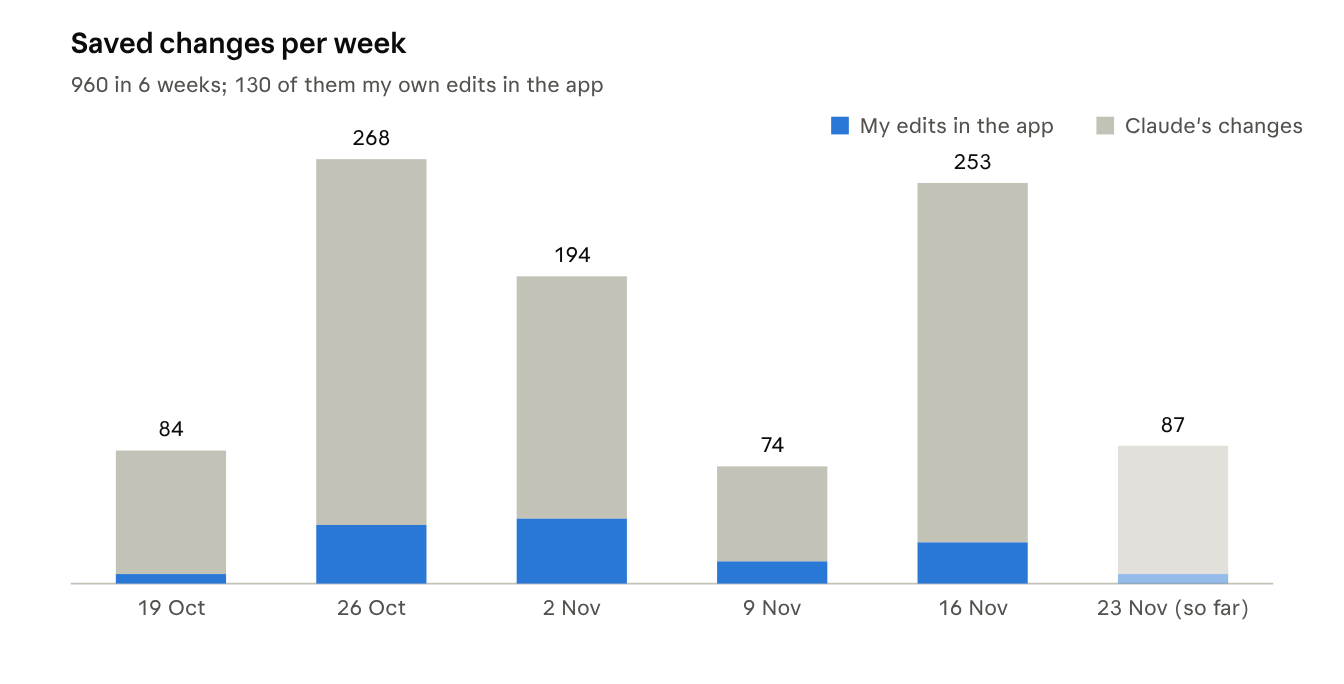
The busy weeks are the ones with talks coming up. The tool follows the work, not the other way round.
Under the hood
I am not a developer, and I didn't write the code. I decided what it should do, and Claude wrote and tested it. The parts are simple on purpose:
- Each slide show is one HTML file. It opens in any browser, with no app and no internet needed. A shared engine (about 1,200 lines of CSS and JavaScript) gives every deck the same behaviour, and themes give it its look, in a dark and a light mode.
- The Mac app is written in Swift (about 8,700 lines). It wraps the HTML decks in a native window with a home screen, in-place editing, notes, chapters and PDF export.
- A toolbox of Python scripts (about 6,300 lines) does the careful work: changing one slide without touching the rest, keeping translations in step, and checking that the project follows its own rules.
- Git keeps every version. Claude saves after every change with a note on what and why, so nothing is lost and I never keep copies named "final_v3".
- Claude works in two places: Claude Code on my Mac for building the app, and Claude's desktop app (Cowork) for deck work.
What I learned
Start with intent, not slides. When I write down what the audience should leave with before anything else, every later choice has something to aim at. Most of my best edits are cuts that the intent made obvious.
Pick the task you repeat. A tool for a one-off rarely pays back. A tool for something you do every week pays back every week.
Write the rules down. The biggest jump came when my preferences stopped living in my head. How I like a slide built, how I want to be asked, what may never be changed without me: it is all in short written rules that Claude reads at the start of every session.
Keep the AI a tool, and yourself the owner. Nothing is moved, deleted or sent without my yes. Every change is saved and can be undone. That is what makes it safe to let it work fast.
Ask for criticism, not just output. Faster slides are nice. An honest read on whether the story delivers my intent is what made the decks better.
What comes next
What comes next is less a list of features than a habit. I keep using it on real work and improve it in two directions. The workflow: any step from brief to finished deck that feels slow or clumsy gets smoothed out. And the storytelling: whenever a deck's narrative doesn't hold together, the lesson goes into the briefs, the story checks and the written rules, so the next story comes out more coherent. The goal is simple: less of my time spent managing look, feel and structure, and more of it spent on the content and the story I actually want to tell.
Insight: A personal tool earns its place not by being fast, but by keeping every draft aimed at what you meant to say.
The rules and skills behind this are described in An update on my working setup.
Tags: claude, workflow, storytelling